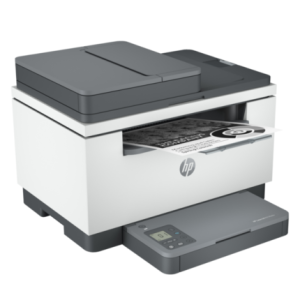




| Functions | Print, copy, scan |
|---|---|
| Print speed black (ISO, A4) | Up to 29 ppm 1 |
| First page out black (letter, ready) | As fast as 6.9 sec 2 ( 3 Measured using ISO/IEC 17629. For more information see http://www.hp.com/go/printerclaims. Exact speed varies depending on the system configuration, software application, driver, and document complexity.) |
| First page out black (A4, ready) | As fast as 7 sec 2 ( 3 Measured using ISO/IEC 17629. For more information see http://www.hp.com/go/printerclaims. Exact speed varies depending on the system configuration, software application, driver, and document complexity.) |
| First page out color (letter, ready) | 2 ( 3 Measured using ISO/IEC 17629. For more information see http://www.hp.com/go/printerclaims. Exact speed varies depending on the system configuration, software application, driver, and document complexity.) |
| First page out color (A4, ready) | 2 ( 3 Measured using ISO/IEC 17629. For more information see http://www.hp.com/go/printerclaims. Exact speed varies depending on the system configuration, software application, driver, and document complexity.) |
| Duplex printing | Auto-duplex |
| Duty cycle (monthly, letter) | Up to 20,000 pages (Duty cycle is defined as the maximum number of pages per month of imaged output. This value provides a comparison of product robustness in relation to other HP LaserJet or HP Color LaserJet devices, and enables appropriate deployment of printers and MFPs to satisfy the demands of connected individuals or groups.) |
| Duty cycle (monthly, A4) | Up to 20,000 pages (Duty cycle is defined as the maximum number of pages per month of imaged output. This value provides a comparison of product robustness in relation to other HP LaserJet or HP Color LaserJet devices, and enables appropriate deployment of printers and MFPs to satisfy the demands of connected individuals or groups.) |
| Recommended monthly page volume | 200 to 2,000 (HP recommends that the number of printed pages per month be within the stated range for optimum device performance, based on factors including supplies replacement intervals and device life over an extended warranty period.) |
| Print quality black (best) | Up to 600 x 600 dpi |
| Print languages | PCLmS; URF; PWG |
| Print technology | Laser |
| Connectivity, standard | 1 Gigabit Ethernet 10/100/1000 Base-TX network; 1 Hi-Speed USB 2.0 (device); Wireless 802.11b/g/n, Dual band 2.4GHz/5GHz |
| Mobile printing capability | Apple AirPrint™; HP Smart App; Mopria™ Certified; Wi-Fi® Direct Printing Wireless operations are compatible with 2.4 GHz and 5.0 GHz operations only. Learn more at hp.com/go/mobileprinting. Apple Airprint -Mobile device must have AirPrint®. Wi-Fi Direct® printing- Feature is supported on select printers. Mobile device needs to be connected directly to the signal of a Wi-Fi Direct® supported MFP or printer prior to printing. Depending on mobile device, an app or driver may also be required. For details, see hp.com/go/mobileprinting. Wi-Fi Direct is a registered trademark of Wi-Fi Alliance®. The Mopria® Logo is a registered and/or unregistered trademark of Mopria Alliance, Inc. in the United States and other countries. unauthorised use is strictly prohibited. Requires the HP Smart app download. For details on local printing requirements see hp.com/go/mobileprinting. Certain features/software are available in English language only, and differ between desktop and mobile applications. Internet access required and must be purchased separately. HP account required for full functionality. Fax capabilities are for sending a fax only, and may require additional purchase. For more information, see: hpsmart.com/mobile-fax. |
| Network capabilities | 1 Ethernet 10/100Base-TX; 1 built-in Wi-Fi 802.11b/g/n |
| Wireless capability | Yes, built-in Wi-Fi 802.11b/g/n |
| Minimum System Requirements for Macintosh | Apple® macOS v10.14 Mojave, macOS v10.15 Catalina, macOS v11 Big Sur; 2 GB available hard disk space; Internet required |
| Minimum System Requirements | Microsoft® Windows® 10, 8.1, 8, 7: 32/64-bit, 2 GB available hard disk space, Internet connection, Microsoft® Internet Explorer |
| Display | 4 cm (1.6 in) Icon LCD |
| Processor speed | 500 MHz |
| Maximum Memory | 64 MB
|
| Memory | 64 MB |
| Memory card compatibility | No |
| Internal Storage | No |
| Compatible Operating Systems | Windows 11; Windows 10; Windows 8; Windows 8.1; Windows 7; macOS 10.14 Mojave; macOS 10.15 Catalina; macOS 11 Big Sur; macOS 12 Monterey; Linux (Not supporting Windows® XP 64-bit and Windows Vista® 64-bit; Full solution software available only for Windows 7 and newer; For Windows Server 2008 R2 64-bit, 2012 64-bit, 2012 R2 64-bit, 2016 64-bit only print driver is installed. Windows RT OS for Tablets (32/64-bit) uses a simplified HP print driver built into the RT OS; Linux systems use in-OS HPLIP software) |
| Paper handling input, standard | 150 sheet input tray |
| Paper handling output, standard | 100 sheet output tray |
| Media types | Paper (laser, plain, rough, vellum), Envelopes, Labels, Cardstock, Postcard |
| Media sizes supported | A4; A5; A6; B5 (JIS) |
| Media sizes, custom | 101.6 x 152.4 to 216 x 356 mm |
| Scanner type | Flatbed, ADF |
| Scan file format | JPEG, TIF, PDF, BMP, PNG |
| Scan resolution, optical | Up to 600 dpi |
| Scan resolution, hardware | 600 x 600 dpi |
| Scan size (ADF), maximum | 216 x 356 mm |
| Scan size (ADF), minimum | 148 x 210 mm |
| Scan size, maximum | 216 x 297 mm |
| Scan speed (normal, A4) | Up to 19 ppm (black and white), up to 10 ppm (colour) 4 |
| Scan speed (normal, letter) | Up to 20 ppm (b&w), up to 11 ppm (color) 4 |
| Automatic document feeder capacity | Standard, 40 sheets |
| Duplex ADF scanning | No |
| Copy speed (black, normal quality, A4) | Up to 29 cpm |
| Copy resolution (black text) | Up to 600 x 600 dpi |
| Copies, maximum | Up to 99 copies |
| Copy reduce / enlarge settings | 25 to 400% |
| Copier settings | Reduce/Enlarge; Number of Copies; Lighter/Darker; Optimise; Paper size/type. It supports collation and single-sided on ADF bundles |
| Power consumption | 453 watts (active printing), 3.3 watts (ready), 0.6 watts (sleep), 0.6 watts (Auto Off/Wake on LAN, enabled at shipment), 0.04 watts (Auto-off/Manual-on), 0.04 (Manual Off) (Power requirements are based on the country/region where the printer is sold. Do not convert operating voltages. This will damage the printer and void the product warranty. Power consumption values typically based on measurement of 115V device.) |
| Power | 220 to 240 VAC (+/- 10%), 60 Hz/50 Hz, 2.8 A |
| Operating humidity range | 10 to 80% RH |
| Recommended operating humidity range | 30 to 70% RH |
| Non-Operating Humidity Range | 10 to 90% RH |
| Operating temperature range | 15 to 32.5ºC |
| Operating temperature range | 59 to 90.5ºF |
| Blue Angel compliant | Yes, Blue Angel DE-UZ 219—only ensured when using Original HP supplies |
| Typical electricity consumption (TEC) number | 0.256 kWh/Week (Energy Star); 0.684 kWh/Week (Blue Angel) 5 ( Power requirements are based on the country/region where the printer is sold. Do not convert operating voltages. This will damage the printer and void the product warranty. Energy Star value typically based on measurement of 115V device.) |
| Energy savings feature technology | HP Auto-on/Auto-off Technology |
| Ecolabels | EPEAT® Silver |
| Energy star certified | No |
| Safety | EN 60950-1:2006 +A11:2009 +A1:2010 +A12:2011+A2:2013; IEC 60950-1:2005 +A1:2009+A2:2013; IEC/EN 62368-1:2014; IEC/EN 60825-1 3rd Edition; EN 62479:2010 / IEC 62479:2010 |
| Security management | Secure Boot, Secure Firmware Integrity, Runtime Code Integrity, password protected EWS, secure browsing via SSL/TLS 1.0, TLS 1.1, TLS 1.2; TLS 1.0/1.1 disabled by default; Update to OpenSSL version 1.1.1; Enable/disable Network ports; SNMPv1, SNMPv2, and SNMPv3, community password change; Secure defaults, Encrypted data at rest, Active FW update, Admin password by default, Cipher & TLS selection; Account lockout; Secure Wi-Fi setup |
| Minimum dimensions (W x D x H) | 418.0 x 308.0 x 294.4 mm |
| Maximum dimensions (W x D x H) | 418.0 x 467.6 x 452.8 mm |
| Weight | 9.5 kg |
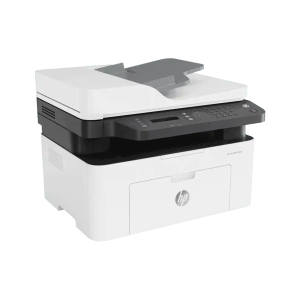
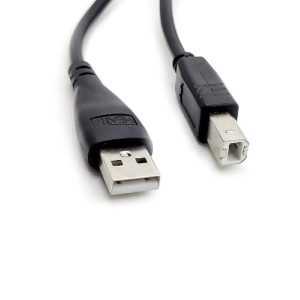
| What’s in the box | HP LaserJet MFP M234sdw Printer; HP Black LaserJet Toner Cartridge (700 page yield); Reference Guide; Setup Poster; Warranty Guide & Flyer in some countries; CD-ROM containing software driver & electronic documentation; Power cord; USB cable 6 |
| Number of print cartridges | 1 (black) |
| Replacement cartridges | HP 136A Black LaserJet Toner Cartridge, W1360A (1,150 yield), HP 136X Black LaserJet Toner Cartridge, W1360X (2,600 yield) 3 ( 7 Declared yields based on ISO/IEC 19752 and continuous printing. Actual yields vary considerably based on images printed and other factors. For details see http://www.hp.com/go/toneryield) |
| Manufacturer Warranty | One-year limited warranty |
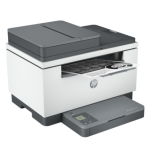
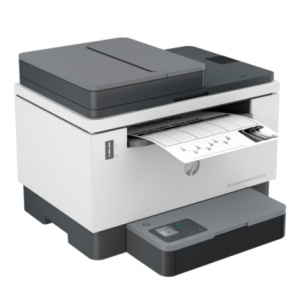
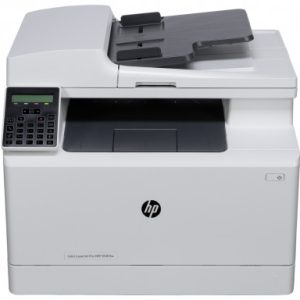
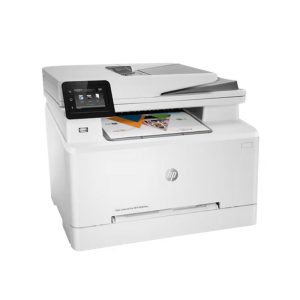
HP LaserJet MFP M236sdw Printer
Request A Quote
Request A Quote
Description
Related Products
Featured
Featured
Recently Viewed